Chatlulu: AI Video & Photo
- 2.3
- Rating
- 500.00K
- Installs
- Free
- Price

 Analysis by App-foxy
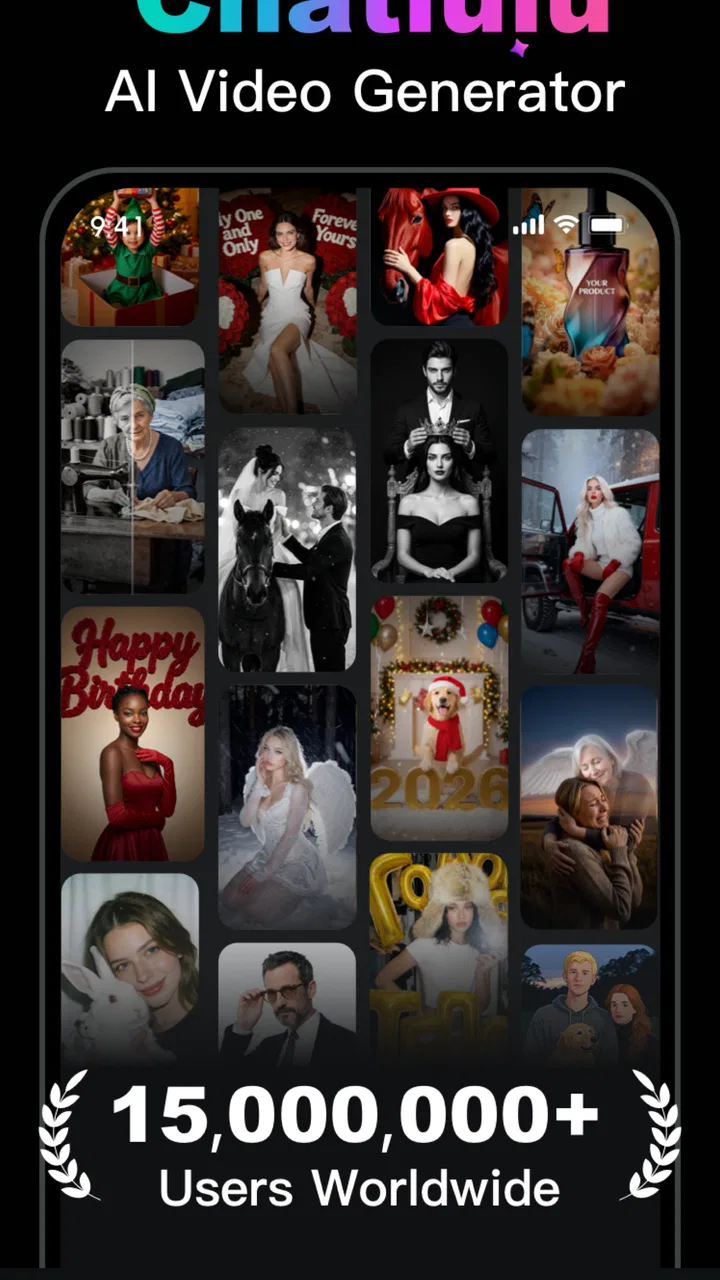
I opened Chatlulu: AI Video & Photo with a very specific expectation: I wanted to see whether it could turn a rough idea into something I could actually share, rather than simply offer another collection of flashy AI buttons. It is a free tools app from Hong Kong Endless Flow Technology Limited, aimed at making short-form creative work easier through templates for AI videos, photos, avatars, and captions. That combination makes sense for people who want a quick social post but do not want to learn a full editing suite.
My overall impression is mixed. The app is approachable when I begin with a clear visual idea and choose a template that already matches it. The process feels less demanding than building a video from a blank timeline. At the same time, the experience is not consistently polished, and the low average rating of 2.3 from around 1.3 thousand ratings is a useful warning that convenience does not automatically translate into reliability or quality for everyone.
From a rough idea to a finished post
I find Chatlulu most useful when I treat it as a quick creative starting point, not a complete publishing workflow. In this section, I’ll look at how a clear goal, a well-chosen image, and a final review can make the jump from an AI-generated draft to a post feel more intentional. That distinction matters even more when several people share a device and need to keep their creative choices separate.
You May Also Like

 Blood Strike: 2.5 Anniversary
Blood Strike’s Loadouts Turn Every Drop Into a Tactical Gamble
A close look at Blood Strike’s custom loadouts: how fast access to signature weapons reshapes its battle royale rhythm, rewards preparation, and narrows the gap between fights.

 Pandora - Music & Podcasts
Pandora’s Music Is Easy to Start, but Harder to Recover
Pandora’s strength is its low-effort path from a seed to a station. Its weak spot is how much confidence it asks you to place in connection, setup, and quiet recovery.

 8 Ball Pool
 Is Built on Rivalries, Rematches, and Routine
A close look at the rivalries, rematches, shared routines, and unanswered safety questions that turn a quick pool match into a persistent mobile community.

 Samsung Music
’s Quiet Strength Is Playing What You Already Own
Its reach comes less from spectacle than from dependable access to a personal library. That simplicity is both the app’s strongest retention engine and its ceiling.

 AccuWeather: Weather Radar
AccuWeather Review: A Quick, Clear Forecast for Everyday Decisions
For everyday plans, the best forecast is the one you can understand quickly. AccuWeather makes rain timing, radar, and local conditions easy to act on, with a few trade-offs.

 Hill Climb Racing
Why Hill Climb Racing Still Turns Crashes Into One More Run
A tiny car, a bumpy hill and one more upgrade: Hill Climb Racing keeps resurfacing because its simple chaos makes every near-miss feel personal.
More From Our News Desk



Starting with the right kind of project
The best way to use Chatlulu is not to open it without a plan and hope the app discovers one for you. I get better results when I start with a small, concrete goal: a birthday image, a playful avatar, a short announcement, or a caption to accompany a photo. The template-driven approach is built for that kind of decision. Instead of asking me to design every element, it gives me a starting shape and lets the AI treatment do much of the visual work.
This is particularly useful when the input material is ordinary. A single portrait or a small group of photos can feel unremarkable in a normal gallery, but a suitable template can give it a more deliberate presentation. That does not mean every result looks original. Template-based creation naturally creates a trade-off: I gain speed and structure, but I give up some control over composition and personality.
I would describe the app as a lightweight creative assistant rather than a replacement for a professional editor. If I need exact timing, detailed sound mixing, carefully controlled typography, or a repeatable brand layout, I would rather use a conventional video or design tool. Chatlulu makes more sense when the desired outcome is “make this look interesting quickly,” not “build a finished production with precise technical control.”
The first handoff: choosing material that can survive the transformation
The quality of the final result depends heavily on what I give the app. Clear faces, good lighting, and images with a simple subject tend to be safer starting points than crowded photographs or pictures where the main person is partly hidden. This is not a special trick so much as a practical way to reduce the amount of interpretation the AI has to perform.
For an everyday scenario, imagine I want to post a quick congratulations message for a friend. I would first select one strong portrait, decide whether the mood should be amusing or warm, and then look for a template that supports that mood. I would avoid feeding the app a dozen unrelated images simply because they are available. More material does not necessarily create a better story; it can make the result feel assembled rather than intentional.
There is also a useful distinction between making a photo and making a post. A generated image can be attractive on its own, while a caption needs to explain why the image exists. I prefer to treat the visual and the wording as two related but separate decisions. The avatar or video establishes the attention-grabbing part, and the caption supplies the context that the template cannot know.
Working through templates instead of a blank canvas
Once I choose a direction, the template becomes the main handoff between my idea and the generated result. This is where the app is easiest to understand. I am not expected to build every transition or invent a complete visual system. I select a format, provide the relevant material, and let the app apply its interpretation.
The important tip is to judge a template by its structure before judging it by its thumbnail. A dramatic preview may look appealing, but it may also crop a face, emphasize movement that does not suit the subject, or leave too little room for a useful caption. I get a more usable result when I ask whether the template matches the purpose of the post. A calm portrait needs a different treatment from a humorous reaction image, even if both previews look impressive in isolation.
For short videos, I would also decide in advance where the finished piece will be viewed. A result intended for a quick social feed should be readable at a glance. If the template depends on subtle details, tiny wording, or a long buildup, its effect may disappear when someone scrolls past it. Chatlulu can help create the asset, but I still have to make the editorial decision about whether the asset communicates quickly.
Captions are more useful when I edit the idea, not just the grammar
The caption feature is one of the more practical parts of the concept because it can reduce the blank-page problem. Still, I would not treat an AI-generated caption as the final voice automatically. A caption can be grammatically smooth and still sound too vague, too enthusiastic, or unlike the person posting it.
My preferred workflow is to use the generated wording as a draft. I keep the central idea, remove exaggerated phrases, and add one detail that connects it to the actual image. For the birthday example, that might mean mentioning an inside joke or a specific memory rather than accepting a generic celebration line. This small edit is what makes the post feel personal instead of merely processed.
There is a hidden efficiency here: separating creation from approval. I can let the app suggest a visual and a caption quickly, then review both together before sharing. That prevents a common mistake in automated content, where the image suggests one mood while the text suggests another. The handoff between those two elements deserves as much attention as the generation itself.
Avatars and photos serve different purposes
The avatar side of the app is more suitable for playful identity experiments than for a serious professional profile. I can imagine using it to refresh a chat image, create a lighthearted post, or give a group of informal visuals a common style. It is less convincing as a substitute for a carefully photographed headshot, especially when consistency and recognizability matter.
AI photos have a broader range of uses, but they carry the same question: do I want a transformed version of reality or an entirely new visual? For a personal post, a stylized transformation can be enjoyable. For an announcement, product explanation, or practical message, an overly artificial image may distract from the information. I would choose the app when the creative effect is part of the point, not when accuracy is the point.
The second handoff: moving the result into real life
Creating something inside an app is only half the workflow. The real test is what happens when I take the result into a messaging app, a social feed, or my camera roll. Before sharing, I would check the crop, the readability of any text, and whether the generated subject still looks natural after being viewed outside the creation screen.
This step matters because an effect that looks balanced in a preview can feel crowded in a feed. Captions may wrap differently, faces may sit too close to an edge, and a visual joke may be less obvious without the surrounding template interface. I recommend saving a draft and viewing it at the size where other people will actually see it. That simple check catches problems that generation alone cannot solve.
I would also keep the original photo or source material until I am satisfied with the outcome. A generated version should be treated as an additional interpretation, not as a replacement for the original. Keeping both makes it easier to try a different template, compare results, or return to a more natural image if the first attempt feels excessive.
What the finished result does well
When the template, source image, and intended mood line up, Chatlulu can shorten the distance between an idea and a presentable post. I do not need to spend a long time learning layers, masks, or animation controls. That makes it appealing for casual creators, people preparing quick personal updates, and anyone who finds traditional editing software intimidating.
The app also encourages experimentation. Because the starting point is a template rather than a blank project, I am more willing to try a different visual direction. That can be valuable when I know the subject but do not yet know how I want to present it. The strongest outcome is not necessarily the most elaborate one; it is the version that communicates the intended feeling without requiring an explanation.
For a small business owner or independent creator, the app could help with occasional idea generation. I would use it for a quick concept, a seasonal visual, or a rough social post when speed matters more than strict brand consistency. I would not rely on it alone for a complete content pipeline, because a serious publishing routine needs dependable control over layout, tone, revisions, and repeatability.
Where the flow breaks down
The biggest weakness is the gap between a fast first result and a result that feels genuinely finished. AI generation can produce something eye-catching, but eye-catching is not the same as accurate, coherent, or personal. I sometimes have to make a choice between accepting an imperfect interpretation and spending more time trying alternative templates. That reduces the advantage of speed.
The template model can also make different projects feel too similar. If I use the app repeatedly without editing the results, my posts may inherit the same visual habits as everyone else using comparable templates. The solution is not complicated: change the caption, remove unnecessary decoration when possible, and choose source material with a clear personal connection. Even then, users seeking a distinctive visual identity may outgrow the app quickly.
Another point to consider is cost. The app itself is free, but in-app purchases range from $6.99 to $39.99 per item. That means I would explore the free experience carefully before committing to paid content. A single impressive preview is not enough reason to spend money; I would first decide whether the available workflow fits my regular needs and whether the paid option gives me meaningful creative value rather than just another variation.
Compatibility is relatively broad for an Android tools app, with a minimum operating system of Android 7.0. That makes it accessible to people using older devices, although the practical experience can still depend on the phone’s performance and available space when working with generated media. I would keep expectations realistic on an older handset: a simple photo transformation is a more sensible test than immediately attempting a demanding video workflow.
Who should try it, and who should skip it
I think Chatlulu is worth trying if I want quick AI-assisted visuals, enjoy experimenting with avatars, or regularly need a starting point for captions. It is especially approachable for someone who does not want to learn a full editor just to make an occasional post. Its Everyone content rating also makes it suitable for a broad audience, though that does not remove the need for personal judgment when creating or sharing images.
I would skip it if my priority is precision. A professional social manager who needs fixed brand templates, a filmmaker who needs detailed timeline editing, or a user who wants complete control over every generated element will probably be happier with a more specialized alternative. I would also hesitate if I dislike template-driven aesthetics or expect every result to look unique without manual editing.
Compared with ordinary photo editors, this app offers more help at the idea stage but less control at the finishing stage. Compared with dedicated video editors, it is easier to approach but not as suitable for detailed production. Compared with manual caption writing, it is faster for overcoming hesitation but less personal until I revise the wording. Those are not flaws in isolation; they define the audience it serves.
My practical way of using it
If I were recommending it to a friend, I would suggest a small trial rather than a full commitment. Start with one photo that has a clear subject, choose a template based on the intended message, and compare the generated result with the original. Then test whether the caption actually sounds like something you would say. If the visual needs a long explanation or the wording feels generic, the workflow has not succeeded yet.
I would also create a simple approval routine: check the face and hands in the image, read every word in the caption, view the result outside the app, and keep the source file. These checks are especially useful for AI-assisted content because a polished surface can hide small mistakes. They take little time and prevent an embarrassing post from reaching friends or followers.
The current release is version 1.0.9, and the app has passed the half-million-install mark, so it has attracted substantial curiosity despite the modest average rating. I would interpret that combination carefully: there is clear interest in this kind of quick creative tool, but broad adoption should not be confused with a universally smooth experience. My own recommendation is conditional rather than enthusiastic.
My final take after following the full workflow
Chatlulu: AI Video & Photo works best as a fast bridge from a rough idea to a shareable experiment. It helps me avoid the empty canvas, gives ordinary images a more playful direction, and can supply a first draft for captions. The strongest results come from choosing the input carefully and treating the generated output as something to edit, not something to accept blindly.
Its limitations become clear when I need consistency, precision, or a distinctive personal style. The paid items also make it sensible to test the free experience before spending, particularly with the average rating sitting at 2.3. For casual creators, curious users, and people who want a quick visual starting point, I can see the appeal. For demanding editing work, I would choose a dedicated alternative.
My honest recommendation: try it for one small, real project and judge the complete handoff from source image to shared post. If that process saves you time without making the result feel generic, the app has a useful place in your toolkit. If you still need to rebuild everything elsewhere, Chatlulu is better viewed as an idea generator than as your main creative workspace.
FAQs for Chatlulu: AI Video & Photo
01What is Chatlulu: AI Video & Photo, and what can I use it for?
Chatlulu: AI Video & Photo is an AI-powered creative app designed to help users generate, edit, and transform visual content. Depending on the available tools and your selected plan, you may be able to create AI images, enhance photos, apply artistic effects, and produce short video content from prompts or uploaded media. It is mainly aimed at social media creators, casual users, and anyone who wants quick results without advanced editing skills.
02Is Chatlulu: AI Video & Photo free to download and use?
The app may be free to download, but some of its AI generation features, premium styles, export options, or higher-quality results can require in-app purchases or a subscription. Before starting a trial, check the pricing page carefully, including the renewal terms and cancellation procedure. Free credits or limited daily generations may also be available, although these limits can change with future updates.
03Do I need to upload my own photos or videos to use Chatlulu?
Not necessarily. Chatlulu may offer tools that work from text prompts, but many of its photo and video effects are designed to process images or clips supplied by the user. If you upload personal media, review the app’s privacy policy to understand how files are stored, processed, and deleted. Avoid uploading sensitive documents, private images, or content belonging to someone else without permission.
04Does Chatlulu: AI Video & Photo work well on every Android and iOS device?
Compatibility and performance can vary considerably between devices. AI processing, video previews, and high-resolution exports may work more smoothly on newer phones with sufficient storage, memory, and a stable internet connection. Older devices can experience longer processing times, crashes, or limited export quality. Check the app store requirements for your version of Android or iOS before downloading it.
05Are the images and videos created with Chatlulu safe to publish or use commercially?
You should not assume that every generated image or video is automatically cleared for commercial use. Usage rights can depend on the app’s current terms, the subscription level, the source material you provide, and whether the result includes recognizable people, brands, or copyrighted styles. Review Chatlulu’s licensing conditions before using content in advertisements, client projects, monetized channels, or business campaigns.
Pros
- Creates AI videos and photos from simple text prompts.
- Offers creative templates for quick social media content.
- Easy interface suitable for beginners with no editing experience.
- Supports experimenting with multiple visual styles and effects.
- Can help generate ideas when you need fresh content inspiration.
Cons
- Results may vary noticeably depending on the quality of the prompt.
- Some advanced tools or exports may require a paid subscription.
- AI-generated faces
- hands
- and text can occasionally look unnatural.
- Processing times may increase when creating complex videos.
- Regular use may require a stable internet connection and significant data.

Chatlulu: AI Video & Photo
Gallery